
Before you start
The wallet you used on the old system, and an email address you can open.
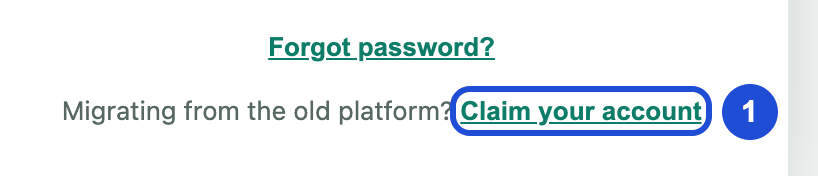
Go to the sign-in page. Under Migrating from the old platform?, select Claim your account.
Slide the piece into the slot.
Choose your wallet and connect it. On a phone, use Open in to open SPCores inside your wallet app.
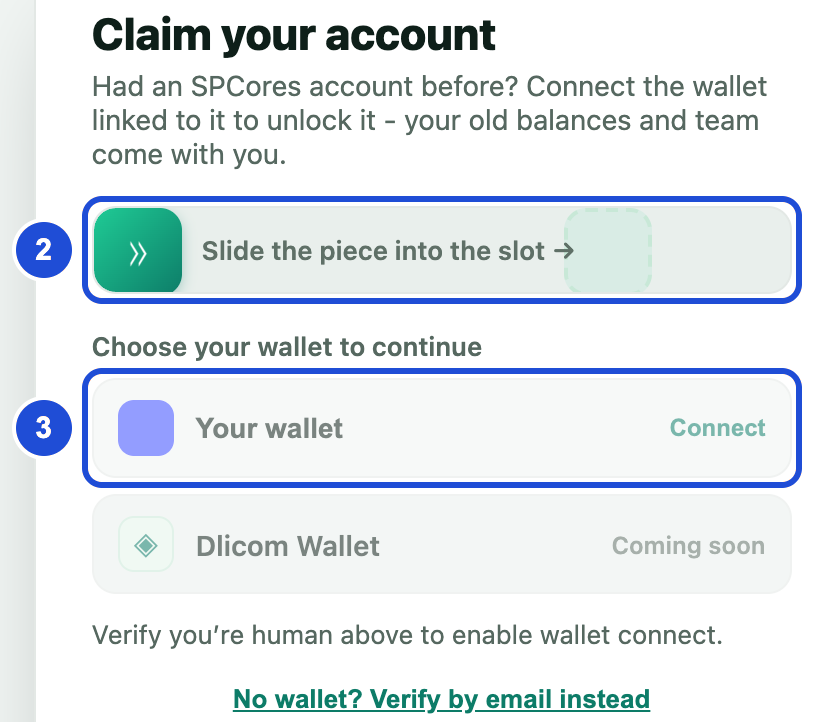
Steps 2 and 3. Your own wallet appears in the list. Check the account name shown, then select Sign to verify ownership and approve in your wallet. This is free and sends no transaction.
Fill in your username, first name, last name, country and email. You can keep your username or choose a new one.
Create a new password with at least 8 characters, an uppercase letter, a lowercase letter, a number and a symbol.
Select Finish & verify email.
Open the link we email you within 24 hours, then sign in.
If something goes wrong
no unclaimed account is linked to this wallet
- Why
- You connected a different wallet, or this account is already claimed.
- What to do
- Select Use a different wallet, or try signing in.
No wallet detected
- Why
- This browser has no wallet.
- What to do
- Install your wallet app, or open SPCores inside it.
Your wallet does not respond
- Why
- The wallet may not work with this browser.
- What to do
- Try a different browser, or open SPCores inside your wallet app.
Already taken
- Why
- Another member has this username.
- What to do
- Choose another with 4 to 12 characters and at least one letter.